 FlowShow
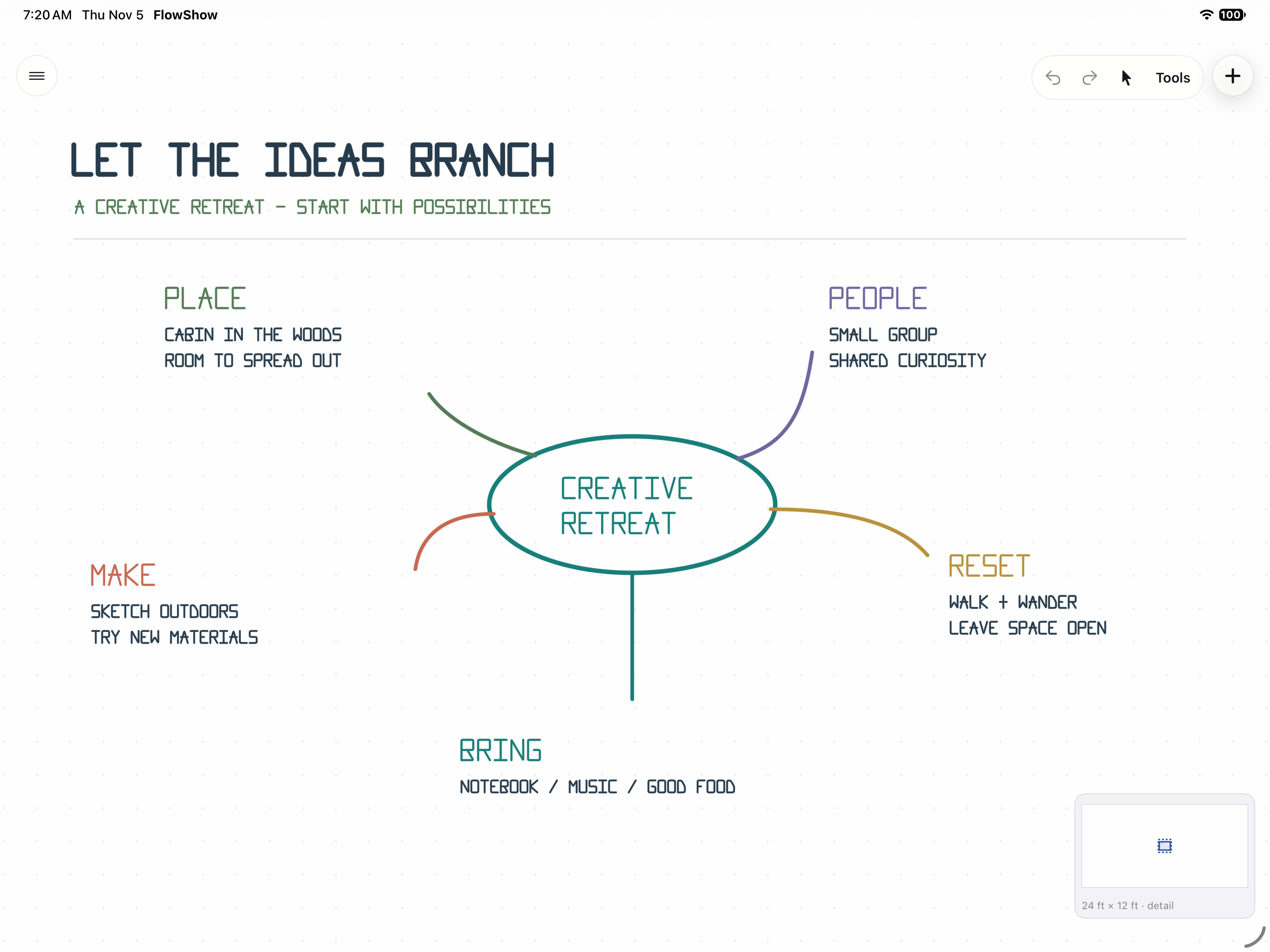
The creative-retreat board begins with one central idea and five branches: Place, People, Make, Reset and Bring. It leaves room for the relationships to emerge before deciding which ideas deserve a task or a date.
Write a question that can grow
Start with a central phrase or question. Put it inside an inserted shape when you want a clean, adjustable boundary, or write it directly with Apple Pencil for a looser start. Leave open space in more than one direction.
For your first map, choose a topic with a manageable scope: one event, a design problem or a decision. A central heading such as “Everything” gives every branch permission to become another entire project.
Add branches before sub-branches
Use a line, curve or freehand stroke to connect the central idea to a few broad categories. In the example, Place and People hold practical choices while Make and Reset describe what participants might do. Bring captures supporting material without making it part of every other branch.
Use a consistent ink color for a category when it helps you trace it across the board. The color is a visual choice, not an automatic relationship or a data field.
Keep a branch readable
Write a few short notes near each category. When a branch grows too crowded, move its editable objects farther from the center or continue it into another region. Use the minimap to preserve the relationship between the overview and the detail.
Inserted lines and shapes are editable geometry. A drawn branch is ink. Neither should be described as an automatic smart connector: after moving an object, inspect the connections and adjust them deliberately. Grouping related objects can help, but native ink is not automatically included in an object group.
Bring in one useful reference
An image can make a place or design direction concrete. Import it, resize it proportionally and use non-destructive crop or opacity when appropriate. A PDF or supported Office document can sit beside the relevant branch without replacing the map.
Keep the conclusion in the map itself. A reference should support the reasoning, not hide it behind a file card. Use the image-reference guide for the import and placement controls.
Decide what deserves to become a plan
Review the map from the center outward. Mark the ideas you want to keep and write the next question beside anything unresolved. There is no need to force every branch into the same level of detail.
When a branch becomes a sequence of concrete actions, move that planning into a clearly separate region or board. The roadmap example provides a structure for stages; the weekly plan provides a structure for days.
Preserve the thinking
Use an editable JSON export to keep the board available for future work, including the relevant assets. Choose PNG or SVG when someone only needs the visible map. Inspect a visual export at the size the recipient is likely to read, especially when a distant branch contains small notes.