 FlowShow
The calculator's MATRIX key opens its Edit and Math workflows. FlowShow supports real matrices A and B, with editable grids up to 10 × 10. Matrix results use numerical arithmetic rather than symbolic or complex matrix algebra.
Enter a matrix
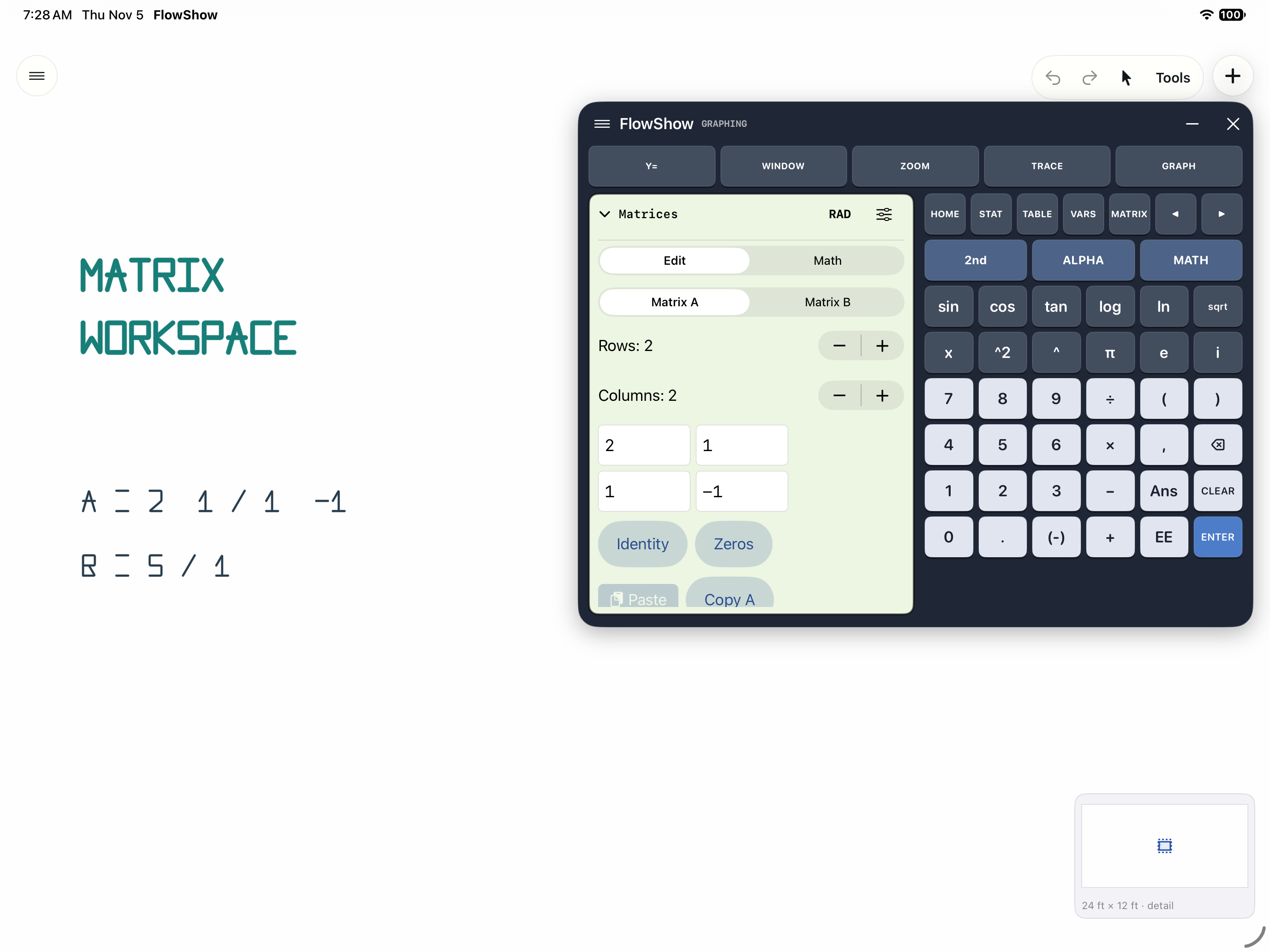
Open MATRIX and choose the Edit page. Select A or B, set the row and column counts, then enter values into the grid. Identity and zero fills provide useful starting points. Paste and copy are available for rectangular data.
Check dimensions before calculation. A matrix with the right numbers arranged in the wrong shape represents a different problem.
Paste safely
Pasted data is checked for rectangular structure and text limits. A malformed paste should not be treated as a successful replacement. Inspect the cells after pasting and keep the original text when a structure error is reported.
The documented CSV interchange does not support nested comma-argument expressions. For reliable interchange, use simple real values and verify the shape before performing operations. Numerical expressions in cells are evaluated when the calculation runs.
Available operations
Matrix tools include addition and subtraction, multiplication in either order, scalar multiplication, integer powers, determinant, inverse, transpose, row reduction, rank, augmentation and solving A·X = B. Results can be stored in A or B, or in scalar Ans when appropriate.
Matrix multiplication is order-sensitive. A·B and B·A can produce different results, and one order may be invalid when dimensions do not match. Addition and subtraction require matching dimensions.
Work through a small system
Consider these two equations:
2x + y = 5
x - y = 1
Enter the coefficient matrix and right-hand side as:
A = [ 2   1 ]     B = [ 5 ]
    [ 1  -1 ]         [ 1 ]
Use the A·X = B solve operation. The result is x = 2 and y = 1. Substitute the result into both original equations to verify it: 2·2 + 1 = 5 and 2 − 1 = 1.

This is an independently checkable example. It does not mean that every matrix is invertible or every system has one well-conditioned solution.
Dimensions and multiple right-hand sides
The solver supports multiple right-hand-side columns when their dimensions are compatible. Each column represents another system with the same coefficient matrix. Keep the meaning of each column clear when copying the result.
Invalid dimensions, non-real or nonfinite entries, and singular or ill-conditioned systems produce explicit errors. A singular matrix is not fixed by adding more displayed decimal places. Revisit the mathematical problem and its input data.
Preserve precision when copying
Result storage and round-trippable numerical copy are kept separate from display rounding. The screen's chosen number format is a presentation setting. Do not manually transcribe a heavily rounded display when you need the more precise stored result.
After storing a result in A or B, remember that later operations use the new stored matrix. Keep a copy of your starting data when you need to compare alternative calculations.
Matrices beside a drawing
Keep the calculator open while writing the equations or geometric interpretation on the board. Insert a result or graph where useful, but leave enough context to identify what the numbers represent.
The per-board workbook preserves matrix work. An editable board export is the right route when you need to continue the project; a PNG is for communicating the visible explanation.
Verify the pictured two-equation system
The example screenshots use A with rows 2,1 and 1,-1, and B with rows 5 and 1. Solving A·X = B gives X with rows 2 and 1. Substitution produces 2×2 + 1 = 5 and 2 − 1 = 1. This is a real numerical 2×2 system, separate from any other practice matrix in this chapter.
Check dimensions before Solve: A is 2×2 and B is 2×1. Keep a result as a result until you deliberately choose to store it in A or B; storing can replace the values you were using as inputs.