 FlowShow
 7 provides native, offline editing for supported plain top-level paragraphs in DOCX documents. You can revise and insert paragraphs inside a file card while keeping sketches and references in view. The editor does not claim full Microsoft Word layout or feature compatibility.
Import and inspect
Import a DOCX file onto the board and open its document card. Read the existing structure before editing. A simple brief with ordinary paragraphs is a better first test than a file full of tables, fields and complex layout.
- Open the imported document card.
- Select a supported paragraph to edit.
- Revise the text or insert a plain paragraph using the editor.
- Use Save and confirm that the save completes.
- Reopen the document and check the saved content.
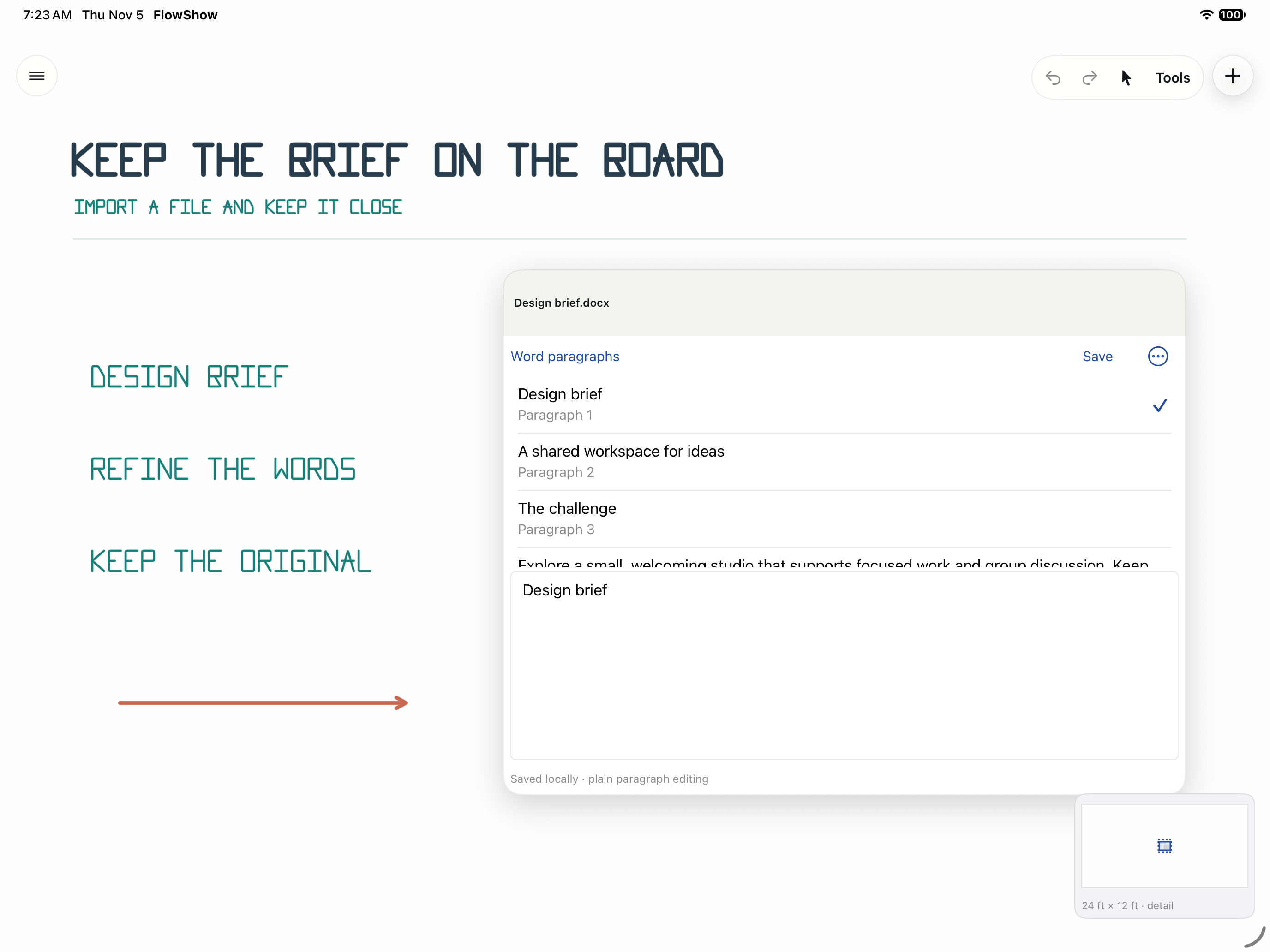
Keep the brief next to the work
The file card can stay beside a storyboard, design sketch or meeting board. Pin the frame position when you want to use its contents without dragging the whole document around.
This is useful for moving between a brief and a visual draft. It does not merge your handwriting into the Word document. Board ink, shape objects and DOCX paragraph edits are different kinds of content with different export paths.
Understand the editing boundary
The supported edit surface is plain top-level paragraphs. Complex structures remain read-only. Unknown package parts, runs, fields and tables are preserved rather than presented as fully editable equivalents.
Do not expect advanced layout, tracked-change workflows, arbitrary table editing, embedded objects or every Word formatting feature. If the document requires those capabilities, continue that work in the appropriate document application.
Legacy .doc files remain preview-only. Renaming a file extension is not a conversion method and does not make an unsupported format editable.
Original and current versions
FlowShow keeps the imported original and edited asset versions immutable. A successful save commits the new version reference to the board before reporting success. That helps distinguish a completed document edit from a change still sitting in an editor buffer.
If Save reports a failure, the buffer remains available. Resolve the issue and save again before assuming that a shared copy contains your changes. Do not discard the original as part of troubleshooting.
A short editing exercise
Use a simple project brief with a title and a few ordinary paragraphs. Change one sentence, insert a paragraph describing the next decision, and save. Reopen the card, then share the latest copy and inspect it in the application that will receive the document.
This checks three separate things: the edit you made, the saved state on the board and the external document you actually shared. It also makes any formatting boundary visible before you apply the workflow to a larger file.
Sharing a document is not exporting a board
Use the file card's sharing action to send the original or latest DOCX copy. Use PNG or SVG when you want to show the board's visual composition. Use editable JSON when you want to move the FlowShow board and its assets for continued work.
A screenshot of the card does not replace an editable Word file, and a Word export does not include all the drawing surrounding the card. Choose the deliverable based on what the recipient needs to do next.
Review in the receiving application
For a document with important formatting, inspect the saved result in the recipient's editor. Preserving unknown structures is not the same as having tested every desktop Office layout. The compatibility reference summarizes which file types are editable and which are previews.
Practice the original-versus-edited handoff
Use a copy of a plain-paragraph brief. Change one sentence, Save, reopen and confirm the change. Share the original and latest edited document to two clearly named destinations and compare that sentence. The original should still contain the imported wording; the latest saved copy should contain the revision.
Keep handwritten review notes on the board outside the file pane. Those notes are not inserted into the DOCX by editing its paragraph. Working with a brief explains how to share the document and visual discussion separately.