 FlowShow
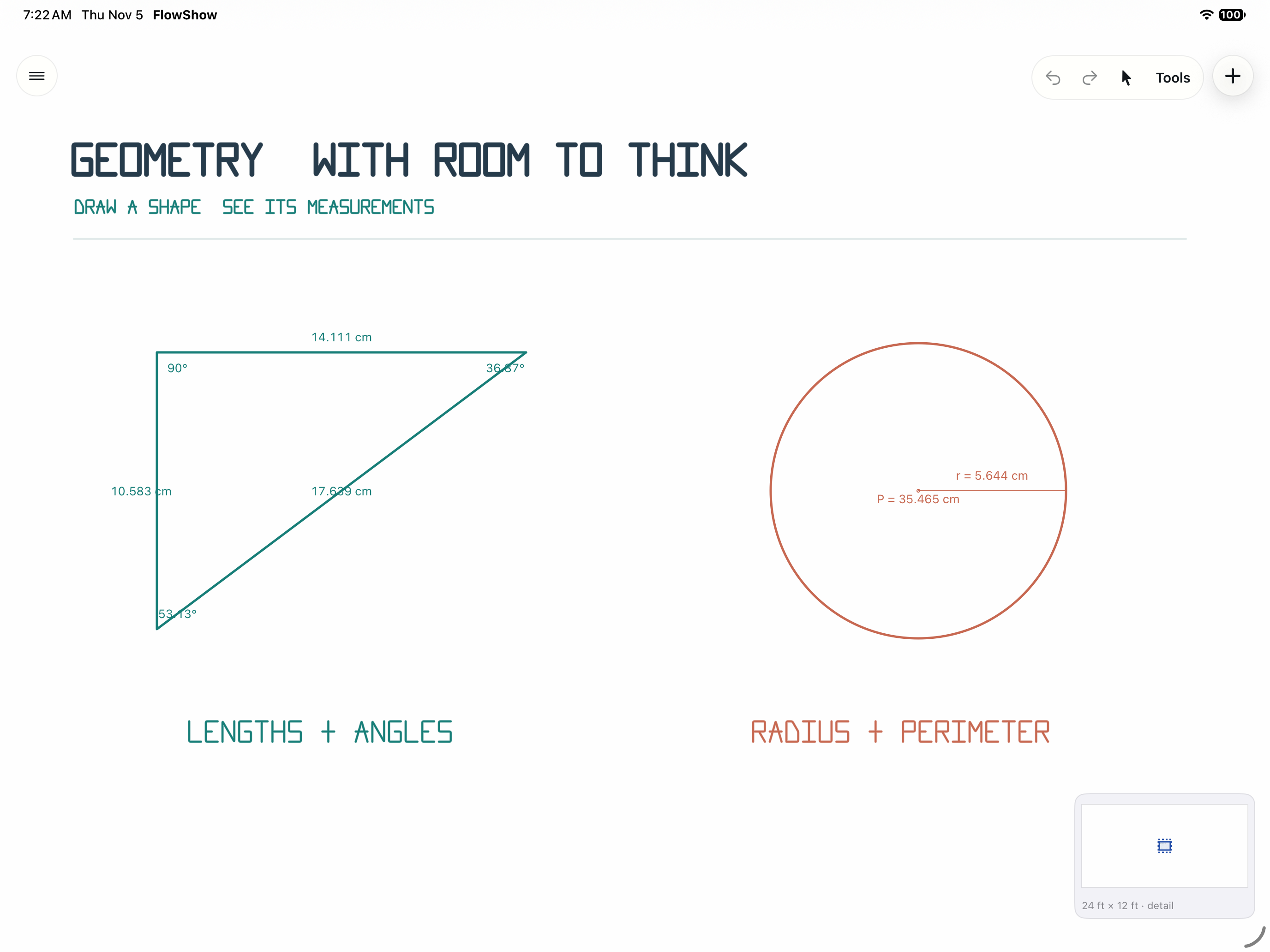
Measurement labels make a technical drawing readable without opening each object's properties. In FlowShow 7, supported geometry can display lengths, angles, radius and perimeter directly on the board.
Display measurements
Long-press a supported line, curve, circle, rectangle, square, triangle or regular polygon and choose Display measurements. Use Hide measurements to remove the visible labels without deleting the geometry.
The measurement state belongs to the object. It is preserved with the drawing and participates in ordinary Undo and duplication behavior. If you duplicate a measured shape, inspect the copy's values after changing its dimensions.
What each object shows
| Geometry | Measurement display |
|---|---|
| Polygon, rectangle, square or triangle | Side lengths and interior angles |
| Line or supported curve | Path length |
| Circle | Radius and perimeter, with a drawn center-to-edge radius |
A circle's radius segment includes a center marker. It gives the value a visible geometric reference rather than leaving a number floating near the shape. The same annotation geometry is used for the view and the visual export.
Read a measurement at the right zoom
Small shapes can omit labels when there is not enough screen space. Zoom in before concluding that a measurement setting has disappeared. Numerical properties provide another way to inspect values, including through accessible object controls.
Labels follow the geometry and document calibration. They do not measure the number of display pixels. Resizing or rotating the view is different from resizing or rotating the object.
Check a simple construction
For a first test, make a right triangle with deliberately chosen dimensions. Display its side lengths and interior angles, then change one dimension and inspect the update. A 3-4-5 triangle is a useful mathematical reference when the drawing uses those actual lengths and a right angle.
For a circle, compare the displayed radius with the geometry you entered. The perimeter follows 2πr, so a radius of 5 units corresponds to a perimeter of about 31.416 units. Display rounding can shorten the number without changing the underlying geometry.
These examples are checks on a construction you set up, not a promise that an arbitrary sketch will automatically become a perfect right triangle or calibrated circle.
Measurements and constraints are different
A label reports the current geometry. A supported constraint can govern how that geometry changes. Turning on measurement labels does not lock the length or angle.
When a line must remain a fixed length, use the supported geometry relationship rather than relying on the number being visible. The precision chapter describes this distinction.
Export with the drawing
Visible measurements use shared geometry in the viewport and export. Review a PNG or SVG at its final size to check label legibility. A label clear on a close-up iPad view may be small when an entire 24 × 12-foot board is reduced to a page or a screen image.
Keep important dimensioned components at a sensible scale within the composition. If the purpose is continued editing, export the editable JSON document as well as the visual result.
When a value surprises you
First check the object's numerical properties and the document units. Then check whether the object is part of a transformed group or a preserved legacy board. Do not change a calibration just to make one unexpected label look right.
Use Undo to compare the previous geometry with the revised result. A saved editable copy is useful before a large scale or layout change. For technical deliverables, independently verify critical dimensions in the tools required by your project.
Try a known-diameter circle
In a centimeter-calibrated document, insert a circle with equal width and height of 10 cm. Display its measurements. The independent checks are radius 5 cm and perimeter 2π×5 ≈ 31.416 cm, subject to display rounding. Zooming should change the view, not those geometric dimensions.
Use the measured-drawing example to practice labels and a protractor beside handwritten reasoning. Its practice dimensions are not a transcription of the pictured circle.